ROS plugin
Visualizing Point Clouds in RViz2
Overview
The Determ RViz2 Viewer is a ROS 2 package that provides visualization and management capabilities for Determ 3D Scene Capture devices. This document explains how to set up, configure, and use the package.
Prerequisites
ROS 2: Humble
Ubuntu 22.04
Determ 3D Scene Capture device(s)
Determ Flowbit library 1.3x /1.4x installed (If not installed, download the built library as described in the instructions below).
Installation
1 . Install ROS 2 Humble
The official ROS 2 Humble installation guideline is here
https://docs.ros.org/en/humble/Installation/Ubuntu-Install-Debs.html
2 . Install Required Dependencies
3. Create a ROS 2 Workspace
4. Clone the repository
5. Configure CMakeLists.txt
Download the zip file and unzip the file in some folder.
Edit the CMakeLists.txt file to point to your FlowBit SDK installation directory:
Update the path to your FlowBit SDK library as shown below:

6. Build the Package
Usage
1. Launch the Viewer
2. Working with Determ Devices
Open another terminal and run the commands as follows:
After connecting and capturing clients, you can manually add point cloud, color, and depth images in RViz 2, as shown in the screenshot below.
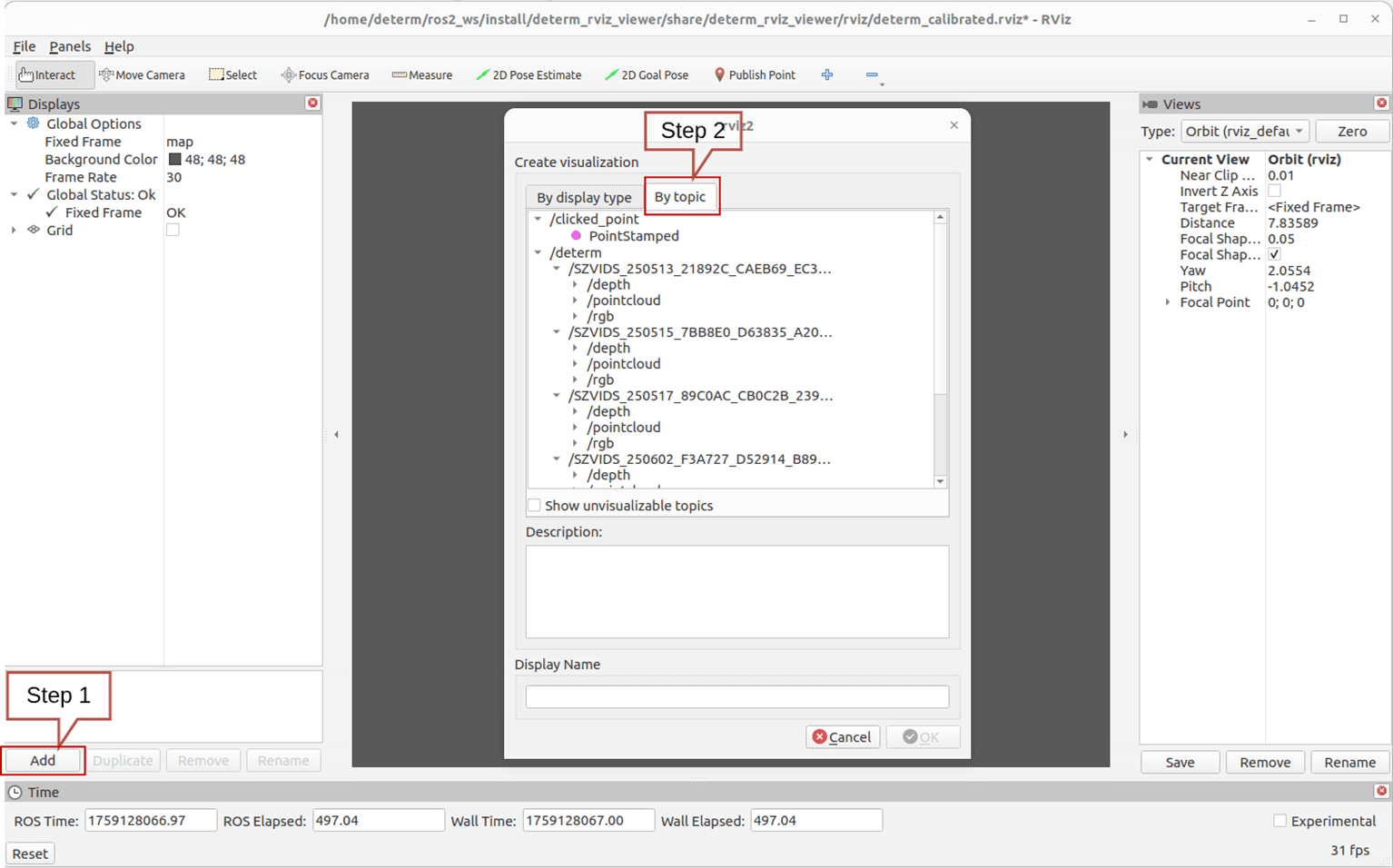
A Python script is provided to automatically load all connected and available clients:
This will:
Call
/determ/list_clientsserviceParse all available client IDs
Generate RViz config with displays for ALL of them
Save to
~/.rviz2/determ_auto_generated.rviz
All client point clouds will be visualized in RViz.
If your clients are calibrated, place the calibration JSON file in ~/ros2_ws/src/determ_rviz_viewer/config as calibration.json. An example calibration file is included in the folder. All extrinsic matrix parameters will be loaded for all clients.
When running the commands above, please review the outputs in both terminals to check the status and any errors. Security is built into every layer.
The Package
1. ROS 2 Topics
The package publishes the following topics:
Topic | Type | Description |
|
| Status messages from the system |
|
| Point cloud data from a specific client |
|
| RGB image from a specific client |
|
| Depth image from a specific client |
|
| Markers for client visualization |
|
| Transform data for the frame hierarchy |
2. ROS 2 Services
The package provides the following services:
Service | Type | Description |
|
| List all available clients |
|
| Connect to the selected client |
|
| Disconnect the selected client |
|
| Start capture for the selected client |
|
| Stop capture for the selected client |
|
| Shutdown the application |
|
| Connect all the client available |
|
| Capture all the clients connected |
|
| Disconnect all the clients |
3. Parameters
The package uses the following parameters:
Parameter | Type | Description |
| string | Path to the Determ configuration directory |
| bool | Whether to publish point clouds as ROS messages |
| bool | Whether to publish RGB and depth images as ROS messages |
| double | Update rate in Hz for the main processing loop |
| string | Frame ID for the world frame |
| string | Client ID for client-specific operations |
Support
For further assistance, please contact the Determ support team.